Platform:Win98,WinME,WinNT 3.x,WinNT 4.x,Windows2000,WinXP,Win7 x32,Win7 x64,Windows2003,Windows Vista Starter,Windows Vista Home Basic,Windows Vista Home Premium,Windows Vista Business,Windows Vista Enterpris
Use Easy Disk Drive Safeguard to hide and lock your local, network, Floppy and USB drives as well as disable the AutoRun feature for them. A password protection can be applied to the program to prevent your users from changing the security settings.
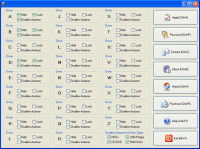
Easy Disk Drive Safeguard is a password-protected security utility that you can use to hide and lock your local, network, Floppy and USB drives as well as disable the AutoRun feature for them. When you hide or lock your drives, they become hidden or unavailable in all Windows software such as Windows Explorer, Outlook Express, Microsoft Office and so on. You can disable the AutoRun feature for specific drives or for certain drive types. If you disable the AutoRun feature for drive types, you can, for example, disable the AutoRun feature for all USB drives, for all CD/DVD drives, for all RAM disks or for all removable HDD drives. The design of the program is very simple. The main window contains the boxes with drive settings that represent individual drives and the toolbar used for applying changes. All you need to do is to click on the checkboxes with settings and after you finish press the apply button. If desired, you can apply password protection to the program to prevent your users from changing the security settings you enforce. This software can be run only under an administrator account, which means that your users will not be authorized to uninstall it. This software has a very nice easy-to-learn user interface. Excellent help system is also available.
Whats new in version 3.66: Smart C drive hiding feature added. Requirements: n/a Operating system: Win98,WinME,WinNT 3.x,WinNT 4.x,Windows2000,WinXP,Win7 x32,Win7 x64,Windows2003,Windows Vista Starter,Windows Vista Home Basic,Windows Vista Home Premium,Windows Vista Business,Windows Vista Enterpris Release notes: Major Update
Invisible Browsing it?s a software to hide IP address preventing others or any website from logging your internet address without your permission. Invisible Browsing is also an efficient internet track eraser.
Price: $29.95, Rating: 4.6, Downloads: 170 Download
Mask Surf Lite is an easy to use Internet activity anonymizing tool, which effectively protects your privacy by hiding or masking you identity while surfing the web. It also protects your privacy by allowing you to clean any browser traces on your PC
Price: $25, Rating: 5, Downloads: 168 Download
IP Hider software is a privacy protection tool that hides IP address preventing your surfing habits and your browsing activity form being tracked by websites or Internet Service Providers
Price: $29.95, Rating: 9.67, Downloads: 159 Download
A software for managing your passwords, including the passwords of your online accounts with the corresponding URLs.
Price: $, Rating: 0, Downloads: 158 Download
History Killer Pro keeps your online and offline privacy by removing dangerous and compromising files. This user-friendly program lets you control what should be cleaned and what stay. History Killer Pro is your online and offline privacy guarantee.
Price: $24.95, Rating: 10, Downloads: 144 Download
User Rating
Rating:2.2 out of
5 Based on13 ratings.
13 user reviews.

 Easy Disk Drive Safeguard 3.66 details